


【PS5: General】How to check whether bonus DLC or additional content is installed in the game
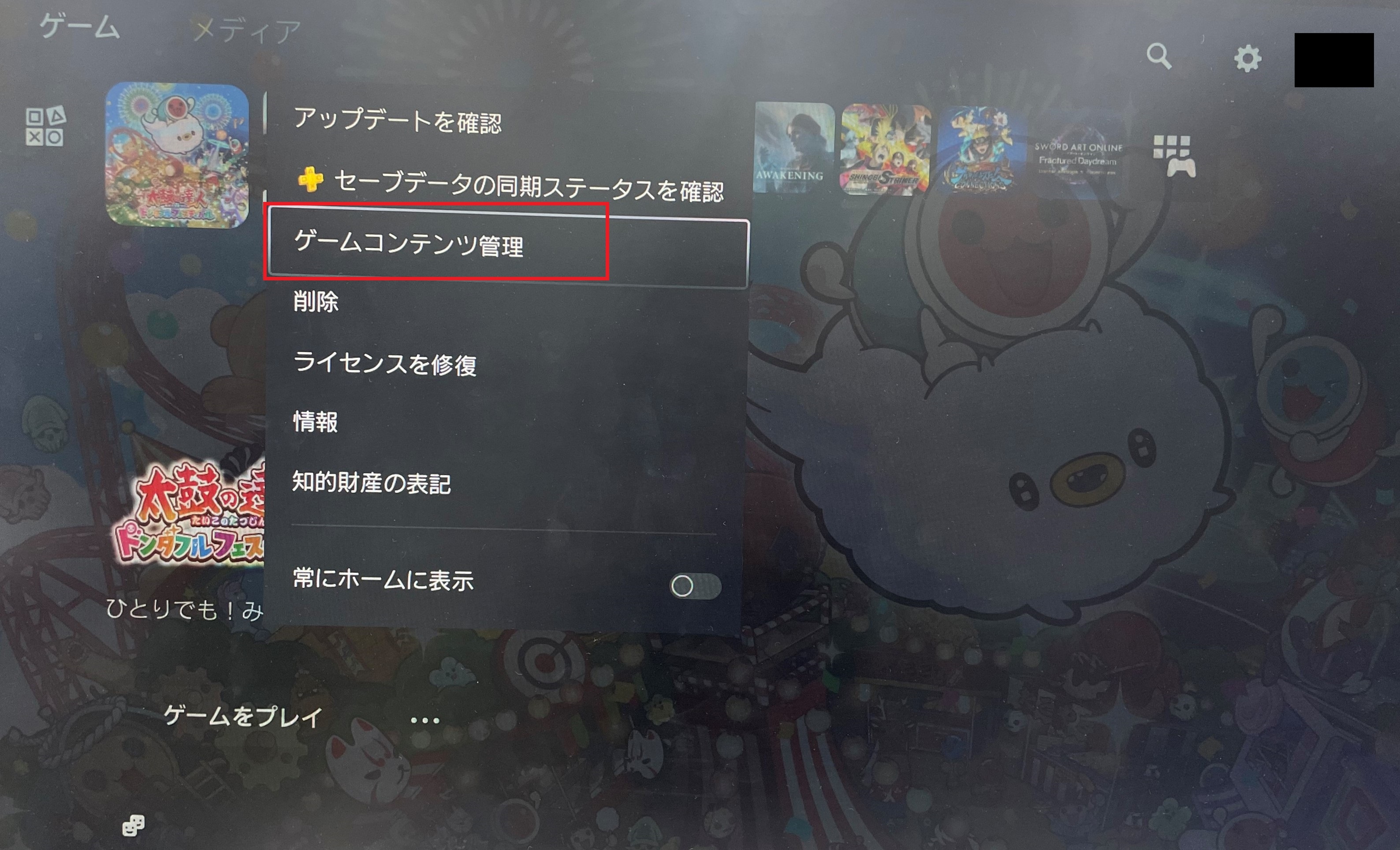
You can check the installation status of bonus DLC or additional content from "Manage Game Content".
■ How to check "Manage Game Content"
From the PlayStation 5 home screen, highlight the game you want to check, press the Options button > select "Manage Game Content".
If it does not show "Installed", proceed with the installation.
For first-time installation of bonus DLC, please refer to the following.
■ If purchased the physical (package) version
Enter the code printed on the bonus leaflet included in the package in the PlayStation Store.
■ If purchased the digital/download version
When installing the base game, select "Download All" to ensure the bonus DLC is installed as well.
* The timing for when bonus DLC or additional content appears in-game may vary depending on the title.
* For detailed information on when the content will be reflected in the game, please refer to the official website of the respective title.
Wenn Sie in den FAQ keine Lösung finden konnten, kontaktieren Sie uns bitte über das untere.
Bitte senden Sie uns Ihre Nachricht über das unten stehende Formular.
Anfragen werden nicht individuell beantwortet, aber Ihre Nachricht wird an die zuständige Abteilung weitergeleitet.